Online Payslip Generators: A South African Guide
Looking for an online payslip generator in South Africa? Discover how payslip generators work, what information to include, how PAYE and UIF affect calculations, and how to choose the right payroll solution for your small business.
By Kiboko Payroll · Published
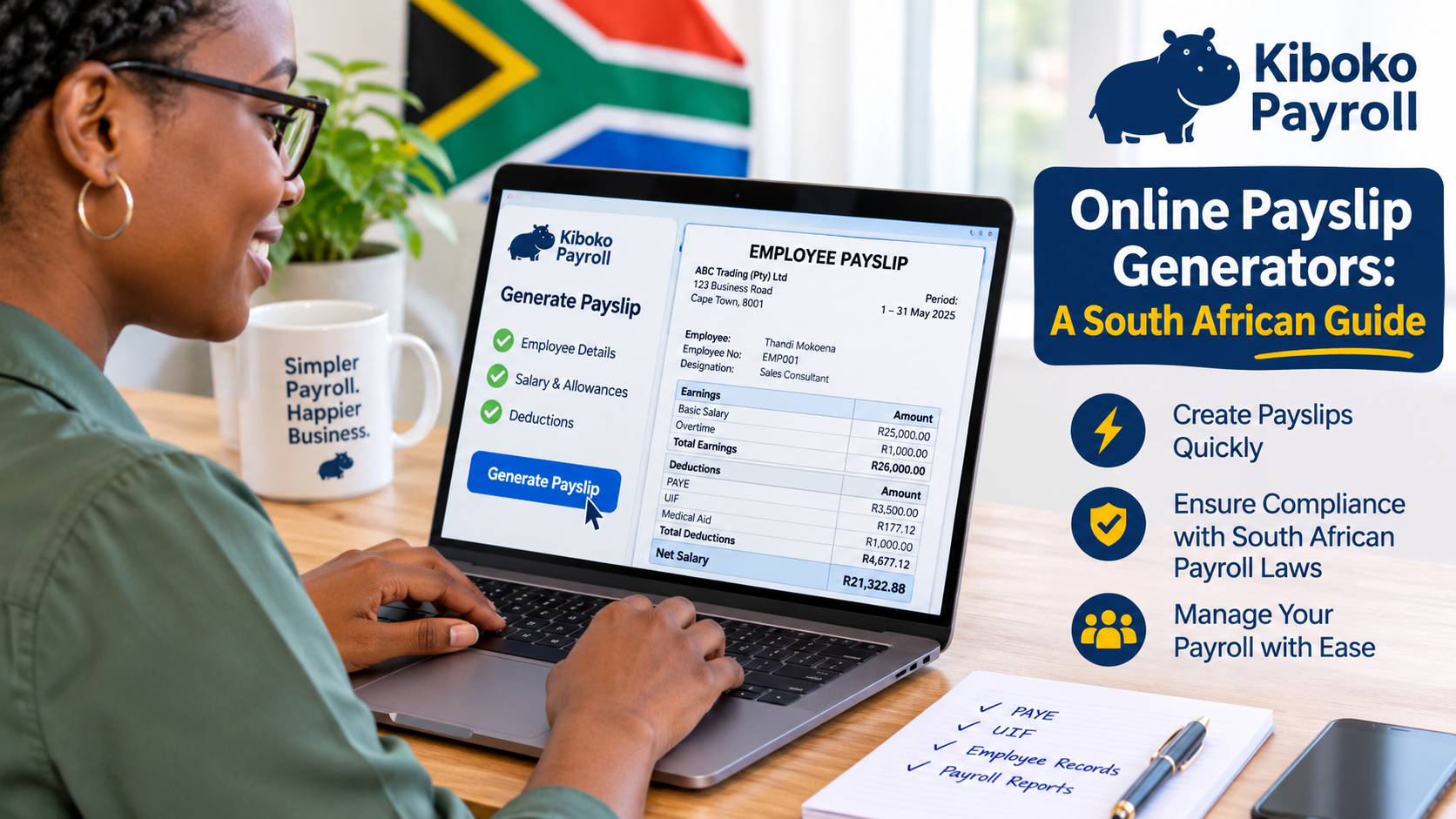
Online Payslip Generators: A South African Guide
Generating employee payslips is an important responsibility for every business that employs staff. Whether you run a small business with one employee or manage a growing company with multiple employees, providing accurate and professional payslips helps maintain transparency and makes payroll administration easier.
Today, businesses can use online payslip generators to create employee payslips without having to design documents manually or calculate every figure using spreadsheets.
But what exactly is an online payslip generator? Are free payslip generators reliable? What should South African employers look for when choosing one?
In this guide, we explain how online payslip generators work, what information should appear on a payslip, how South African payroll calculations affect payslips, and how to choose the right solution for your business.
1. What Is an Online Payslip Generator?
An online payslip generator is a digital tool that allows employers to create payslips for their employees using a website or payroll platform.
Instead of manually preparing documents in Microsoft Word or Excel, employers enter employee and salary information into a system that generates a structured payslip.
Depending on the platform, an online payslip generator may allow you to:
- Enter employee details and salary information.
- Add basic salaries and additional earnings.
- Record allowances, bonuses and overtime.
- Calculate PAYE and UIF deductions.
- Add pension, medical aid and other deductions.
- Calculate net salary or take-home pay.
- Generate downloadable PDF payslips.
- Store historical payslips.
- Distribute payslips electronically to employees.
Some tools only generate a document from information entered manually, while others are part of complete payroll systems that calculate salaries, manage employee information and maintain payroll records.
Understanding this difference is important when choosing a solution for your business.
2. How Does an Online Payslip Generator Work?
Most online payslip generators follow a relatively simple process.
Step 1: Enter Your Company Information
Start by entering your business details.
This may include:
- Company or trading name.
- Business address.
- Company contact information.
- Employer information.
- Company logo.
These details help identify the business issuing the payslip.
Step 2: Add Employee Information
Next, enter the employee's information.
Typical employee details include:
- Full name and surname.
- Employee number.
- Occupation or job title.
- South African ID or passport number, where required.
- Tax reference number, where applicable.
- Employment information.
A good payroll system allows you to save employee information so that you do not need to enter the same details every month.
Step 3: Enter Salary and Earnings
The next step is to enter the employee's remuneration.
Depending on the employee's salary structure, this could include:
- Basic monthly salary.
- Hourly wages.
- Overtime payments.
- Commission.
- Bonuses.
- Travel allowances.
- Other taxable or non-taxable allowances.
- Fringe benefits.
It is important to classify earnings correctly because different types of remuneration can have different tax treatments.
Step 4: Calculate Payroll Deductions
Once earnings have been entered, the generator calculates or records applicable deductions.
Common deductions include:
- PAYE (Pay As You Earn).
- UIF employee contributions.
- Pension or provident fund contributions.
- Medical aid contributions.
- Other authorised deductions.
Basic payslip generators may require employers to calculate deductions themselves, while more advanced payroll systems can automate these calculations.
Step 5: Calculate Net Salary
Net salary is the amount the employee receives after applicable deductions.
The general calculation is:
Gross Earnings - Total Deductions = Net Salary
For example:
| Description | Amount |
|---|---|
| Basic salary | R25,000.00 |
| Overtime | R1,000.00 |
| Total gross earnings | R26,000.00 |
| PAYE | R3,500.00 |
| UIF | R177.12 |
| Other deductions | R1,000.00 |
| Total deductions | R4,677.12 |
| Net salary | R21,322.88 |
This is an illustrative calculation and not an actual PAYE assessment.
Step 6: Generate and Distribute the Payslip
After reviewing the information, the employer generates the payslip.
Most online tools provide a PDF document that can be downloaded, printed or shared electronically.
Some payroll platforms also provide employee portals where staff can access their current and previous payslips.
3. Are Online Payslip Generators Legal in South Africa?
Yes. Employers can use online tools and payroll software to generate employee payslips.
The important consideration is not whether the payslip was created using a website, spreadsheet or payroll application. It is whether the information provided meets the applicable legal requirements.
Section 33 of the Basic Conditions of Employment Act (BCEA), Act 75 of 1997, sets out the written remuneration information that employers covered by this provision must provide when employees are paid.
This includes:
- Employer's name and address.
- Employee's name and occupation.
- Payment period.
- Total remuneration in money.
- Details and purposes of deductions.
- Actual amount paid.
- Applicable ordinary and overtime pay rates.
- Relevant ordinary, overtime, Sunday and public holiday hours.
There are specific exemptions under section 28 of the BCEA, including employers employing fewer than five employees and domestic workers in relation to the provisions covered by section 28(2).
Using an online payslip generator does not automatically guarantee compliance. Employers remain responsible for ensuring that their payroll information is correct and that their payslips contain the applicable required information.
Official reference: Department of Employment and Labour - Basic Guide to Pay Slips.
4. Free Payslip Generators vs Paid Payroll Software
One of the most common questions small-business owners ask is whether they should use a free payslip generator or invest in payroll software.
Both options can be useful, depending on the size and requirements of the business.
Free Online Payslip Generators
Free payslip generators are generally designed to help employers create individual payslips without paying for a complete payroll subscription.
Advantages include:
- No monthly subscription in some cases.
- Quick payslip creation.
- Simple document generation.
- Suitable for occasional payslip requirements.
- No complicated payroll setup for basic use.
However, free generators may have limitations.
For example:
- Manual salary calculations may be required.
- PAYE calculations may not be automated.
- Employee information may need to be entered repeatedly.
- Historical payslips may not be stored.
- Multiple employees may be difficult to manage.
- Leave management may not be available.
- Payroll reporting may be limited.
A free payslip generator can be a useful starting point, but it may become inconvenient as your business grows.
Paid Payroll Software
Payroll software provides more comprehensive payroll management features.
Depending on the platform, businesses may be able to:
- Maintain employee records.
- Process monthly payroll.
- Calculate PAYE and UIF.
- Manage earnings and deductions.
- Generate employee payslips.
- Track employee leave.
- Maintain payroll history.
- Generate payroll reports.
- Manage employee access to payslips.
For businesses with multiple employees, a complete payroll solution can reduce repetitive administration and help prevent manual calculation errors.
Which Option Should You Choose?
| Feature | Free Payslip Generator | Payroll Software |
|---|---|---|
| Generate payslips | Usually | Yes |
| Save employee records | Sometimes limited | Usually |
| PAYE calculations | Depends on tool | Usually |
| UIF calculations | Depends on tool | Usually |
| Employee management | Limited | Yes |
| Leave management | Rarely | Often |
| Payroll history | Depends on tool | Usually |
| Payroll reporting | Limited | Usually |
| Monthly payroll processing | May be manual | Usually automated |
The best choice depends on your business requirements, number of employees and how frequently you process payroll.
5. What Information Should a South African Payslip Include?
Whether you use a free generator or a professional payroll system, your payslip should contain the applicable information required under South African labour legislation.
Here is a checklist of important payslip information.
Employer Details
- Company name.
- Business address.
Employee Details
- Employee's full name.
- Occupation or job title.
Payment Information
- Pay period.
- Total remuneration.
- Applicable ordinary and overtime pay rates.
- Relevant ordinary and overtime hours.
- Relevant Sunday and public holiday hours.
Earnings
- Basic salary.
- Overtime.
- Commission.
- Bonuses.
- Allowances.
- Other applicable earnings.
Deductions
- PAYE.
- UIF employee contribution.
- Pension or provident fund.
- Medical aid.
- Other authorised deductions.
Net Salary
The final amount payable to the employee after deductions.
Remember that some additional information, such as employee numbers, leave balances and year-to-date totals, can improve the usefulness of a payslip but is not necessarily part of the specific minimum requirements in section 33.
For a more detailed explanation, read our guide: What Must Legally Appear on a Payslip in South Africa?.
6. Understanding PAYE and UIF When Generating Payslips
One of the biggest challenges for South African employers is calculating statutory payroll deductions correctly.
A payslip generator that only creates a document is not necessarily calculating the employee's tax obligations correctly.
PAYE (Pay As You Earn)
PAYE is income tax deducted from an employee's remuneration and paid to SARS by the employer.
The calculation depends on several factors, including:
- Employee's taxable remuneration.
- Applicable SARS tax brackets.
- Employee's age and applicable rebates.
- Eligible deductions and tax adjustments.
- Relevant tax-year rules.
Employers should use the applicable SARS tax tables for the relevant tax year.
Using outdated tax rates can result in incorrect employee deductions.
You can use our South African PAYE Calculator to estimate PAYE and take-home pay.
UIF (Unemployment Insurance Fund)
UIF generally requires contributions from both the employer and employee.
The standard contribution structure is:
- Employee: 1% of applicable remuneration.
- Employer: 1% of applicable remuneration.
Contributions are subject to the applicable UIF remuneration ceiling.
The employee's contribution is deducted from their salary, while the employer contributes an additional amount.
SDL (Skills Development Levy)
SDL is generally an employer contribution of 1% of leviable payroll where the employer's annual payroll exceeds R500,000, subject to applicable exemptions.
SDL is not an ordinary deduction from an employee's salary.
A good payroll solution should distinguish between employee deductions and employer contributions to avoid incorrectly reducing employees' take-home pay.
7. Can You Generate Payslips Online Without Excel?
Yes. Online payslip generators allow businesses to create payslips without using Microsoft Excel.
Although Excel is a popular tool for small businesses, manually preparing payslips can become difficult when employee numbers increase.
Common challenges include:
- Maintaining multiple spreadsheets.
- Updating salary information.
- Correcting formulas.
- Calculating deductions manually.
- Creating a separate document for every employee.
- Finding previous payslips.
- Managing different salary structures.
An online payroll platform can centralise employee and payroll information, making it easier to process salaries and generate payslips consistently.
Excel can still be useful for calculations and reporting, but it is not a substitute for a properly managed payroll process.
8. Are Online Payslips Safe?
Online payslips contain confidential employee information.
Depending on the document, this may include:
- Employee names.
- Salary information.
- Tax information.
- Identity information.
- Bank account information.
- Deductions and employment details.
For this reason, employers should carefully consider the security of the platform they use.
The Protection of Personal Information Act (POPIA) regulates how organisations process personal information in South Africa.
When choosing an online payslip generator, consider the following:
Secure Access
Look for a platform that protects employee information through secure authentication and appropriate access controls.
Data Protection
Employee information should be protected against unauthorised access, loss or disclosure.
Secure Document Distribution
Avoid sending sensitive payslips through unsecured public links.
Employee Privacy
Employees should only be able to access their own confidential payroll information unless they have an authorised administrative role.
Reliable Storage
Consider whether the platform maintains payroll records securely and provides access to historical documents.
Employers remain responsible for ensuring that personal information is processed lawfully and securely.
9. What Should Small Businesses Look for in an Online Payslip Generator?
Not all payslip generators offer the same functionality.
Before choosing a platform, consider the following features.
1. South African Payroll Support
The platform should support South African payroll requirements, including PAYE, UIF and applicable SDL calculations.
2. Automatic Calculations
Look for software that calculates salaries and deductions rather than simply placing manually entered amounts into a document.
3. Professional Payslip Templates
Payslips should be clear, professional and easy for employees to understand.
4. Employee Management
The system should allow you to maintain employee records without repeatedly entering the same information.
5. Payroll History
You should be able to retrieve previously generated payslips when employees need them.
6. Leave Management
Employee leave management can be particularly useful for businesses that want to manage payroll and employee administration in one place.
7. Affordable Pricing
Small businesses should look for transparent pricing that makes sense as their employee numbers increase.
8. Employee Self-Service
An employee portal allows staff members to access their payslips without requesting them from the employer every month.
9. Customer Support
Choose a provider that offers assistance when you encounter payroll setup or calculation problems.
10. Regular Updates
South African tax tables and payroll requirements can change. Your payroll provider should maintain its calculations in line with applicable changes.
10. Common Mistakes When Using Online Payslip Generators
Online tools make payslip creation easier, but employers can still make mistakes.
Here are some common problems to avoid.
Using Incorrect Employee Information
Incorrect employee details can result in payroll administration problems and inaccurate records.
Always verify employee information before processing payroll.
Using Outdated Tax Tables
PAYE calculations must reflect the applicable tax year.
Using outdated tax brackets or rebates can result in incorrect deductions.
Forgetting Employer Contributions
Employers should account for their own UIF and SDL obligations separately from employee deductions.
Incorrectly Classifying Allowances
Not all allowances have the same tax treatment.
Employers must understand whether an allowance is taxable, partially taxable or subject to specific conditions.
Not Reviewing Generated Payslips
Even when using automated payroll software, employers should review payroll results before issuing payslips.
Check gross earnings, deductions and net pay.
Ignoring Payroll Records
Generating a payslip is only one part of payroll administration.
Employers should also maintain appropriate records of earnings, deductions, hours worked and supporting payroll information.
11. Online Payslip Generator vs Complete Payroll Management System
An online payslip generator and a complete payroll management system may appear similar, but they solve different problems.
A basic generator focuses primarily on producing a payslip document.
A complete payroll management system helps businesses manage the entire payroll process.
Consider the following example.
A business has 10 employees and pays them monthly.
Using a basic generator, the employer may need to:
- Open the payslip generator.
- Enter employee details.
- Calculate salaries.
- Calculate PAYE and UIF separately.
- Enter deductions.
- Generate individual payslips.
- Download and distribute the documents.
- Repeat the process for every employee next month.
Using a payroll management system, the business can maintain employee information, process payroll using saved records, review calculations and generate payslips as part of one workflow.
The difference becomes more significant as the business grows.
For a business with multiple employees, investing in a complete payroll solution can save time and make monthly payroll administration more manageable.
12. Frequently Asked Questions About Online Payslip Generators
Is there a free online payslip generator in South Africa?
Yes. Some online tools allow employers to generate individual payslips without paying a subscription. However, free tools may have limitations, particularly when it comes to automated PAYE calculations, employee management and payroll history.
Can I generate a payslip online without registering a company?
Some generators allow individuals to create payslips without a registered company. However, businesses must ensure that the employer information and remuneration details shown on their payslips are accurate.
Can I generate a payslip using my phone?
Yes. Many online payslip generators are accessible through mobile browsers. Some payroll platforms also provide mobile-friendly employee portals.
Can an online payslip generator calculate PAYE?
Some generators offer PAYE calculations, while others require employers to enter the tax amount manually. Always check whether the tool uses the correct SARS tax tables for the relevant tax year.
Can I generate payslips for multiple employees?
This depends on the platform. Basic generators may require you to create payslips individually, while complete payroll systems allow you to manage multiple employees and process payroll together.
Can I download my payslips as PDF documents?
Most online payslip generators offer PDF downloads. PDF payslips are convenient because they can be saved, printed or distributed electronically.
Are electronic payslips accepted in South Africa?
Electronic payslips can be used, provided employees receive the required written remuneration information and can access it. Employers should ensure that employees can retrieve and read their payslips.
What is the difference between a payslip generator and payroll software?
A payslip generator primarily creates payslip documents. Payroll software provides broader functionality, including salary calculations, statutory deductions, employee records, payroll processing and reporting.
Is Excel good enough for generating employee payslips?
Excel can be used to prepare payslips, but employers must manage calculations, formulas and employee information themselves. Dedicated payroll software can simplify these tasks and reduce repetitive manual work.
How often should employers generate payslips?
Payslips should be provided each time employees are paid, subject to the applicable BCEA requirements. For monthly-paid employees, this normally means generating payslips every month.
13. Simplify Payslip Generation with Kiboko Payroll
If you are still preparing employee payslips manually or using spreadsheets, it may be time to simplify your payroll process.
Kiboko Payroll is designed to help South African small businesses manage employee payroll without unnecessary complexity.
Instead of using separate tools for employee information, salary calculations and payslip generation, you can manage important payroll activities from one platform.
With Kiboko Payroll, you can:
- Manage employee profiles and payroll information.
- Process employee salaries.
- Calculate PAYE and UIF.
- Manage earnings, allowances and deductions.
- Generate professional employee payslips.
- Manage employee leave.
- Maintain payroll records.
- Give employees access to their payroll information.
Whether you employ one person or manage a growing team, Kiboko Payroll helps make payroll administration simpler.
Start Managing Your Payroll Today
Why spend hours preparing payslips manually when you can simplify the process?
Try Kiboko Payroll and experience a simpler way to manage your South African business payroll.
Your first month is FREE!
- Full access to payroll features during your trial.
- Unlimited employees during your free trial.
- No credit card required.
- Affordable plans for growing businesses.
Get Started with Kiboko Payroll
Kiboko Payroll – Simple, secure payroll for South African businesses.
Official References and Further Reading
For additional information about South African payroll and payslip requirements, consult these resources:
- Department of Employment and Labour - Basic Guide to Pay Slips
- Department of Employment and Labour - Form BCEA4 Pay Slip
- South African Revenue Service (SARS)
- Information Regulator South Africa - POPIA
Disclaimer: This article provides general information about online payslip generators and South African payroll administration. It is not legal, tax or financial advice. Employers should verify applicable legislation, SARS requirements and tax calculations before processing payroll.